Last updated on October 23rd, 2026

Patients looking for nearby care need to know where your practice is, what services it offers, and how to book. Local SEO helps you make that information easier to find and keep it accurate across your website and business listings.
Start with your Google Business Profile, service pages, and location details. Give patient privacy the same attention as visibility when reviewing marketing content.
How local SEO fits a medical practice’s website

Local searches can help people find care near them. Your website also needs clear service information for people researching a condition, checking a provider’s background, or preparing for an appointment.
Google’s local-ranking guidance describes relevance, distance, and prominence. Keep your information accurate and relevant to the services you provide. Results vary with the search and the person’s location; a practice cannot assume a fixed position for every nearby query.
What makes medical local SEO different?
A useful plan needs to account for the way your practice operates:
- Patient privacy: have your privacy or legal adviser review how patient information is used in marketing, testimonials, and public responses.
- Staff capacity: decide who maintains the website and listings, especially when marketing is part of an office manager’s role.

- Clinical accuracy: have appropriately qualified staff check descriptions of services and provider credentials.
- Ongoing changes: update hours, staffing, appointment information, and services as the practice changes. Outside SEO support may help with work your team cannot maintain.
Five local SEO priorities for medical practices
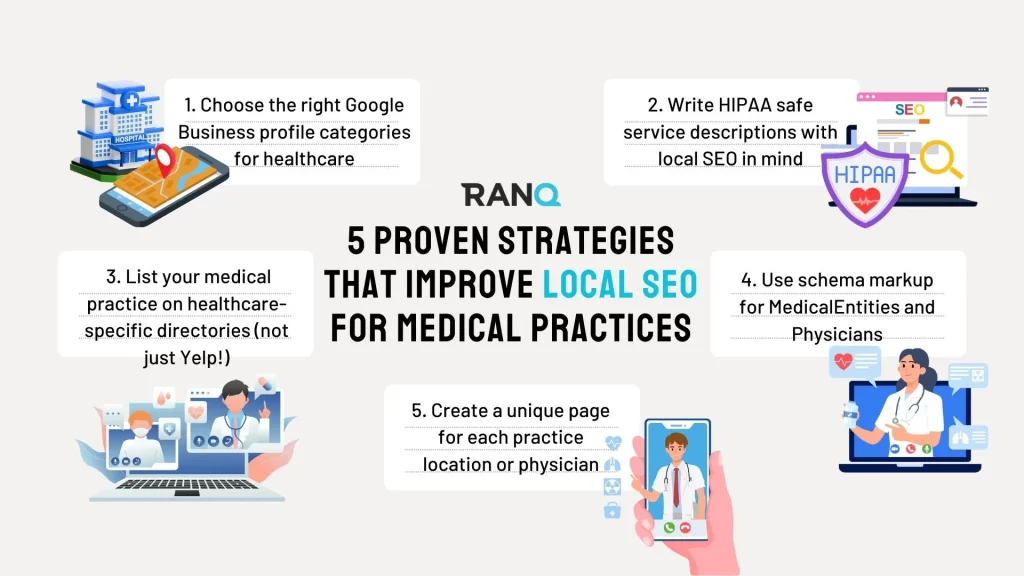
1. Choose accurate Google Business Profile categories
Your profile should describe the practice people will find at that location. Check that its category, address, hours, and contact details match the business.
- Claim and verify an eligible profile using Google’s current process.
- Choose the available primary category that best describes the practice’s main activity.
- Add secondary categories only when they describe services the practice genuinely provides.
- Review Google’s business-representation guidelines. Competitor profiles can provide context, but their categories are not a reason to add services you do not offer.
2. Write clear service pages and protect patient information
Explain the service, who provides it, where it is available, and how a patient can enquire or book. Use the language patients use while keeping clinical claims accurate.
- Include the real location naturally in relevant service information. Describe actual services and availability; avoid adding place names or offers that do not apply to the practice.
- For US practices subject to HIPAA, HHS marketing guidance generally requires an individual’s written authorization to use or disclose protected health information for marketing, with limited exceptions. Removing a name alone does not establish de-identification. HHS describes Expert Determination and Safe Harbor methods. Have your privacy or legal adviser review patient stories and testimonials before publication.
- Use clear headings and natural wording. Repeating locations or service terms unnaturally makes the page harder to read.
- Review the questions patients ask your staff and the queries available in your search reporting. Use them to identify gaps in your service information.
3. Review relevant healthcare directories
Check the directories patients may use to research providers. Accurate listings can help people confirm your details; a listing does not guarantee a ranking benefit.
- Prioritize accurate listings on healthcare-specific websites like:
- Review the practice’s listing on WebMD, where applicable.
- Check provider information on Healthgrades.
- Review Zocdoc information if your practice uses the platform.
- Check relevant Vitals listings.

- Compare the name, address, phone number, and website across the listings you maintain. Investigate conflicting details that could confuse a patient.
- Look for outdated or duplicate listings after an office move, a provider departure, or another change.
- If you use a listings tool, check which directories and corrections it supports. Verify important changes on the directory itself.
4. Use appropriate structured data
Structured data describes information on a page in a format search systems can interpret. Choose types that fit the organization or provider and match the details visible on the page. Relevant healthcare types include:
- For healthcare, there are three types of schema to know
- MedicalOrganization
- MedicalClinic
- Physician
- Google supports specific search features and eligibility rules. Valid structured data does not guarantee a rich result. Adding a healthcare type does not promise a higher local-pack position or the display of ratings and insurance details.
- Have a developer check the markup against the relevant schema and Google feature documentation. Test any supported rich-result implementation before relying on it.
- Keep marked-up information current when provider details, locations, or hours change. Include structured data in the practice’s ongoing website maintenance.
5. Create useful location and provider pages
Give each location and provider a page when there is enough distinct information to help patients choose or prepare for a visit.
A location page should explain the practical details for that office:
- Each location page on your website should include:
- The location’s name, address, and phone number.
- Current opening hours and appointment information.
- A map or clear directions to the office.
- Parking, access, or arrival details that patients need.
- Services available at that location.
- Each provider page on your website should include:
- On a provider page, include the provider’s verified name and credentials.
- Describe specialties and areas of focus accurately.
- Identify the locations where the provider sees patients.
- Add a relevant biography and a current headshot when available.
- Explain how to request an appointment.
Shared information can be reused where it is accurate. Give each page the details that make it useful for that specific office or provider, and keep those details current.
Keep your practice’s information useful and current
Review important pages and listings regularly. Check that patients can find the right office, understand the service, and take the next step without encountering outdated information.
Talk to Ranq if your team needs help with keyword research, content planning, or technical SEO. Your clinical and privacy reviewers should remain involved in claims and patient information.